
Kimi Memory Extension: What Kimi Remembers and What It Won't
Most people searching for a Kimi memory extension assume Kimi does not remember anything. It does, and it is better at it than you might expect.
Knowing what it already covers is the only way to tell whether you need anything else. Once you do, there are two ways to close the gap: the manual way, which costs about five minutes every time you switch chats, and the automated way using Unibase Memory, which captures your Kimi conversations alongside your ChatGPT, Claude, Gemini, Grok and DeepSeek chats so you can search them and send what you need back in.
Both are covered below. Start with what Kimi already does, because for a lot of people that is already enough.
What Kimi actually remembers
Kimi has a feature called Memory space. It records details across conversations, your preferences, your habits, the way you like things written, and draws on them in later chats without being asked.
There is a second mechanism that is unusual. After a conversation ends, the system reviews it later and saves the facts it judges worth keeping: what you work on, your role, the topics you keep returning to. Kimi calls this dream memory. You do not trigger it and it does not announce itself.
You can also set standing instructions. Things like remember that I prefer Python over Node, kept as a list you can edit or delete, capped at fifty entries.
For a lot of everyday use, that is genuinely enough. If you mostly want Kimi to stop asking what you do for a living, Memory space already handles it.
Where it stops
Four gaps come up, and they are the reason people go looking for something else.
It is Kimi only. Nothing you build up in Kimi is available in ChatGPT, Claude or anywhere else. If you use Kimi for long documents and something else for writing, the handoff between them is manual every time, the same way it is when Claude loses context between chats.
It remembers you, not your work. Knowing that you are building a pricing page is different from knowing which three approaches you already rejected and why. Memory space is good at the first and unreliable at the second.
Dream memory is not immediate. Because the review happens after the fact rather than in the moment, something you settled an hour ago may not be there in your next chat. That is a reasonable design choice, but it is not the same as continuity.
Fifty entries is a real ceiling. Standing instructions cap out. On a long project you spend those slots on what you repeat most, and everything else still gets retyped.
The gap is not that Kimi forgets. It is that Kimi remembers who you are, and you needed it to remember what you decided.
Method 1: Carry it across by hand
This works, a lot of people already do it, and you should know it before installing anything.
Step 1. Ask for the handoff before you leave.
Near the end of a working session, while the thread is still responsive, ask Kimi to write you a handoff covering five things by name:
- Goal — what you are trying to produce
- Decisions — what is settled, and the reasoning behind each
- Constraints — formats, tone, limits, things to avoid
- Current state — where the work stands, plus the latest version
- Next step — the single next action
Ask for plain text, not a table. You are going to paste it somewhere else.
Step 2. Read it and fix it.
Summaries drop constraints more reliably than they drop facts. Kimi will happily compress away the rule you spent twenty minutes establishing. Add back what is missing. This takes two minutes and it is the difference between a handoff that works and one that leaves you re-explaining everything when the next conversation gets too long anyway.
Step 3. Save it outside Kimi.
A note, a doc, anywhere that is not the chat you are about to leave.
Step 4. Open the new chat with it, then check.
Paste the handoff first. Before asking for any work, ask Kimi to state back what it thinks the goal and the constraints are. You will find the gaps immediately, usually a constraint that got compressed away.
Step 5. Put the durable parts into standing instructions.
This is the Kimi-specific step. Anything true across every project, tone, output format, tools you never want suggested, belongs in standing instructions rather than in each handoff. Just remember the fifty entry cap, and spend those slots on what you repeat most.
Do this consistently and you have closed most of the gap without installing anything.
What it costs you: about five minutes per handoff, every time, and it only works for the conversations you remembered to do it for.
Method 2: Keep the archive outside Kimi
The second approach is to stop producing a handoff each time and start finding one instead.
Unibase Memory is a Chrome extension that captures your conversations from Kimi, ChatGPT, Claude, Gemini, Grok and DeepSeek, along with any web page you save, into one searchable archive in your browser.
Step 1. Nothing, while you work. Conversations on supported platforms are captured as they happen. There is no moment where you have to remember to save something.
Step 2. When you need it, search. Open the sidebar and search by what was said, not by which chat it was in. Filter by platform or tag if you have a lot.
Step 3. Select the specific messages. Not the whole thread. The exchanges where the decisions were made, the constraints you set, the version that survived.
Step 4. Send them into the chat. One click puts them in the Kimi input box.
Step 5. Edit before you submit. This matters. A handoff almost always needs one correction, and you make it there rather than after Kimi has already run with the wrong version.
The direction that comes up most with Kimi is inward. People use Kimi for long documents and something else for the thinking around them, so the useful move is bringing what you worked out in another assistant into a Kimi chat.
What it does not do. Unibase Memory does not change Memory space, it does not raise the fifty instruction limit, and it does not decide what matters on your behalf. You still select.
What it costs you: an install, and the extension needs permission to read the AI sites it supports, because reading the page is how it captures anything at all. Your conversations stay on your machine by default. If you turn sync on they are locked before they leave, with a key only your browser holds, and everything exports as a file whenever you want.
Which method is right for you
Neither one is better in general. They are better at different frequencies.
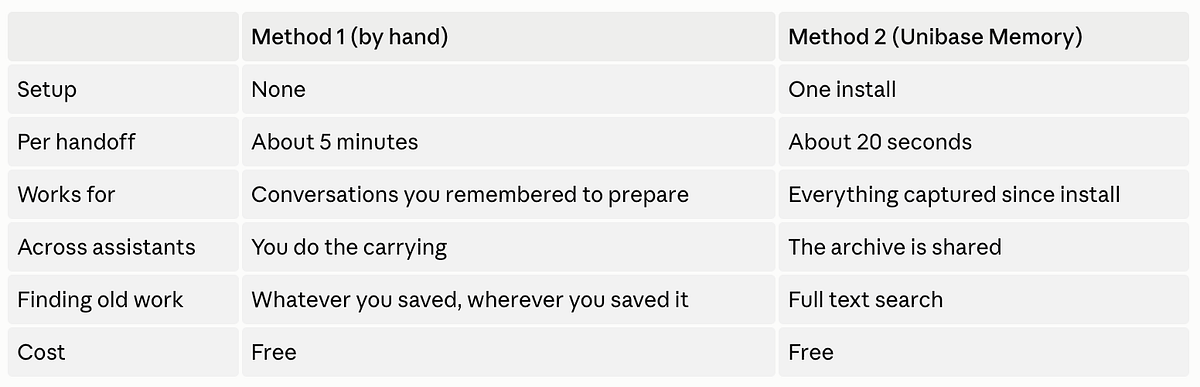
Method 1 is the right answer if you do this once or twice a month, you already keep good project notes elsewhere, or you would rather not install a browser extension that can read your AI chats. That last reason is legitimate and worth taking seriously.
Method 2 starts paying off somewhere around twice a week, or the first time you need a conversation from six weeks ago and cannot remember which assistant you had it in.
A lot of people end up doing both. Standing instructions for the durable rules, the archive for the working state. Those two are not in competition, and keeping context in one place across several assistants is the part neither Kimi nor any single platform will do for you.
Try Unibase Memory on your own chats
The next Kimi chat you open does not have to start from nothing. Search what you already worked out, pick the messages that matter, send them in. About twenty seconds, instead of five minutes of retyping what you decided last week.
Free and your conversations stay in your browser.
Add to Chrome: www.unibase.com/invite/BLOG